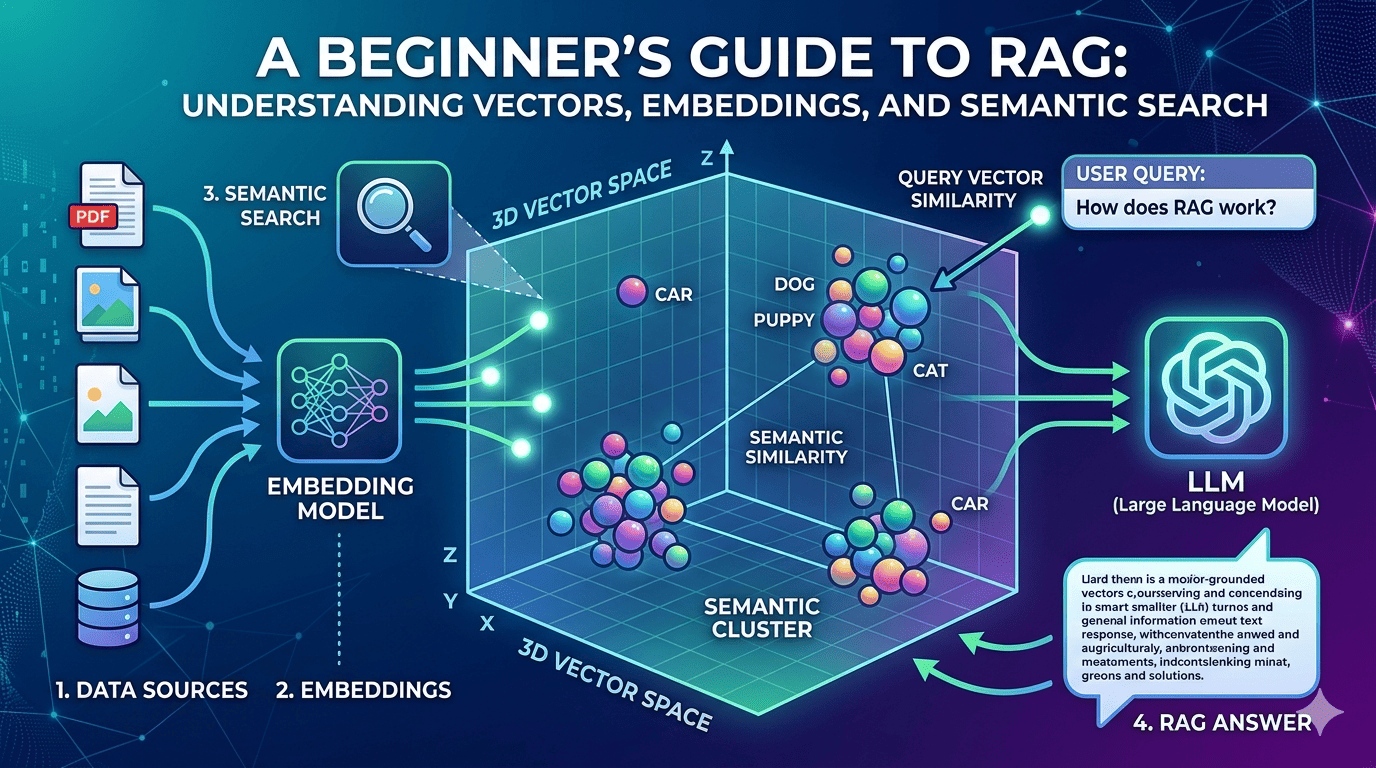
Today while learning about building RAG (Retrieval Augmented Generation) applications, I started from the very first building block - vectors (vector embeddings) and vector search.
While trying to understand it better, something interesting happened.
I went down an interesting rabbit hole and ended up revisiting something from my 12th standard mathematics - 3D vectors.
Back then, a point like:
[x, y, z]
simply represented a position in space.
But in modern AI systems, a very similar idea powers semantic search.
When text, images, or documents are converted into embeddings, they become vectors in a high-dimensional space. Each item becomes a point like:
[0.82, 0.77, 0.61, 0.12, 0.93, ...]
The numbers themselves may not make much sense to humans, but they capture the meaning of the content.
And that’s where the magic begins.
1. What is a Vector?
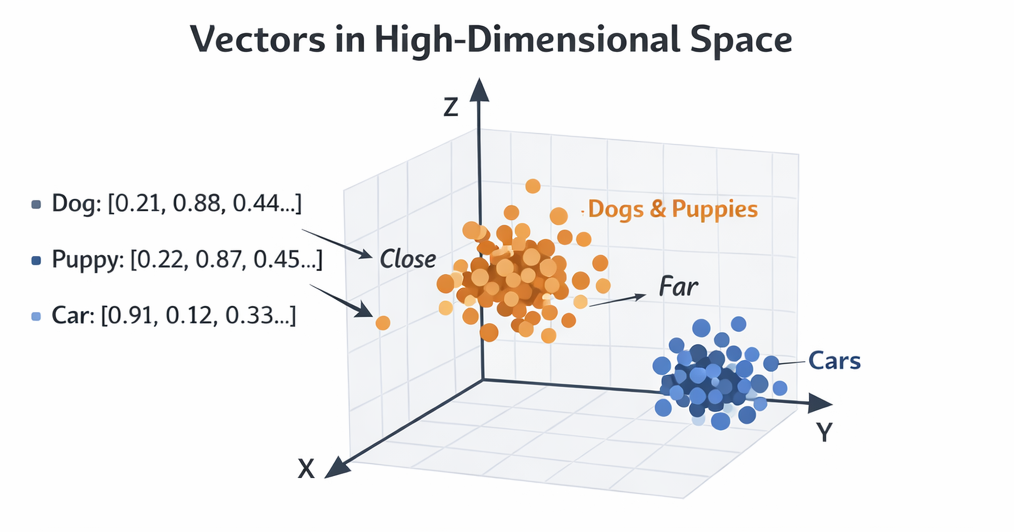 In simple terms:
A vector is just a list of numbers representing something.
In AI systems, vectors represent meaning.
For example:
| Text | Vector Representation |
|---|---|
| "Dog" | [0.21, 0.88, 0.44, …] |
| "Puppy" | [0.22, 0.87, 0.45, …] |
| "Car" | [0.91, 0.12, 0.33, …] |
Notice something interesting:
- Dog and Puppy vectors are very close
- Car vector is far away
That means the system understands semantic similarity.
This is the foundation of semantic search.
2. What is Vector Search?
Vector search is a way to find similar items based on meaning instead of exact keywords.
Traditional search works like this:
User searches: "cheap hotels"
Database looks for documents containing: "cheap" AND "hotels"
Vector search works differently.
It compares meaning in vector space.
Similarity works like this:
- Similar concepts end up closer in vector space
- Different concepts end up far apart
- Search systems simply find nearest neighbors
So if a user searches:
Affordable places to stay
Vector search can still return results about:
Cheap hotels
Budget accommodation
Low cost lodging
Even if those exact words were never used.
In other words:
Semantic search is basically geometry at scale.
Millions or billions of points in a multidimensional space - and we simply find the closest ones.
3. How Vectors Are Generated (Embeddings)
Vectors are created using embedding models.
These models convert content into numeric representations.
Common embedding models
Examples include:
- OpenAI embedding models
- Sentence Transformers
- BERT-based models
- Cohere embeddings
But before we generate embeddings, text must be extracted first.
Because embedding models primarily work with text.
4. What is a Vector Database?
A vector database is designed to store and search vectors efficiently.
Normal databases are good at:
- Filtering
- Exact matching
- Structured queries
But they struggle with similarity search across millions of vectors.
Vector databases solve this using specialized indexing techniques.
Popular vector databases include:
- Pinecone
- Weaviate
- Milvus
- Qdrant
- PostgreSQL with pgvector
They provide:
- Efficient vector storage
- Fast nearest-neighbor search
- Indexing optimized for embeddings
5. Populating a Vector Database (Step-by-Step)
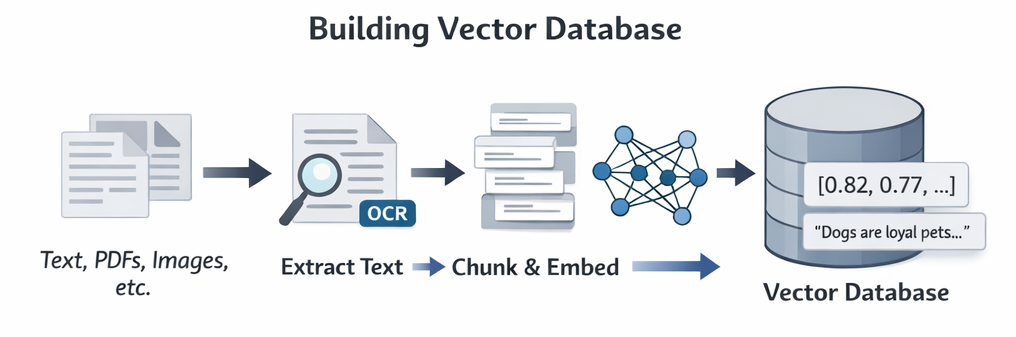 When building a RAG system, the first step is preparing your data.
The primary goal is always to extract text.
Let’s walk through the process.
Step 1 - Collect Data Sources
Your data may come from:
- Text files
- PDFs
- Images
- CSV files
- Web pages
- Documentation sites
Step 2 - Extract Text
This is the most important step.
Examples:
| Source | Extraction Method |
|---|---|
| PDFs | PDF parsers |
| Images | OCR |
| Websites | Web scraping |
| CSV | Direct text extraction |
Sometimes OCR (Optical Character Recognition) is needed when text is inside images.
Example tools:
- Tesseract
- AWS Textract
- Google Vision API
Step 3 - Chunk the Text
Large documents are broken into smaller chunks.
Why?
LLMs and embedding models perform better with smaller context pieces.
Example:
Document (2000 words)
↓
Chunk 1 (200 words)
Chunk 2 (200 words)
Chunk 3 (200 words)
Chunking improves:
- retrieval accuracy
- semantic relevance
Step 4 - Generate Embeddings
Each chunk is sent to an embedding model.
Example:
Chunk text → Embedding Model → Vector
Result:
"AI models learn patterns from data"

→

[0.91, 0.12, 0.55, 0.44, …]
Step 5 - Store in Vector Database
Each record usually contains:
Vector
Original Text
Metadata
Document Source
Storing the original text is important because later we want to retrieve readable content, not just vectors.
6. How Vector Search Works (Step-by-Step)
Now let's see what happens when a user searches.
Step 1 - User enters a query
Example:
"How does authentication work in AWS Cognito?"
Step 2 - Query converted into vector
Query text → Embedding Model → Vector
Example:
[0.45, 0.92, 0.11, …]
Step 3 - Vector database is queried
The vector database searches for similar vectors.
Step 4 - Index helps search fast
Vector databases use special indexes like:
- HNSW
- IVF
- Approximate nearest neighbor
These allow searching across millions of vectors quickly.
Step 5 - Nearest vectors are found
The system calculates similarity using methods like:
- Cosine similarity
- Euclidean distance
- Dot product
Closest vectors are returned.
Step 6 - Retrieve original content
Since we stored the text along with vectors, the system retrieves the actual document chunks.
These chunks contain the relevant information.
7. How RAG Works (Step-by-Step)
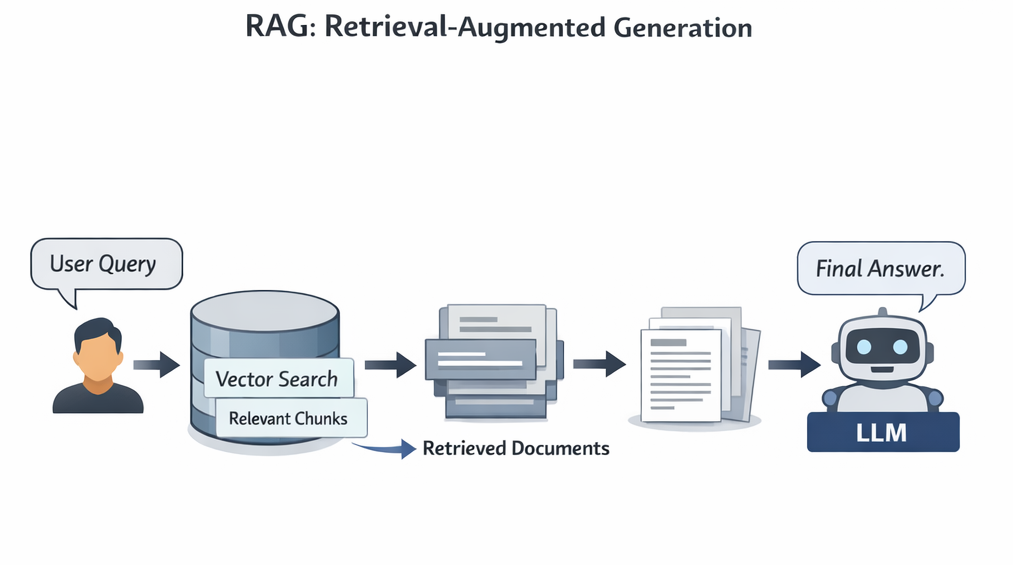 Now we combine everything together.
RAG = Retrieval + Generation
Instead of relying only on the LLM's training data, we provide fresh knowledge during the query.
Here’s the full flow.
Step 1 - User asks a question
Example:
How does AWS Cognito authentication work?
Step 2 - Convert question into vector
User question → Embedding Model → Vector
Step 3 - Perform vector search
Vector database finds relevant document chunks.
Step 4 - Retrieve documents
Relevant chunks are returned.
Example:
Chunk 1: Cognito user pool authentication flow
Chunk 2: OAuth integration
Chunk 3: Token generation explanation
Step 5 - Send documents to the LLM
Those documents are added as context in the prompt.
Example:
User question
+ Retrieved documents
→ Sent to LLM
Step 6 - LLM generates final answer
Now the LLM answers using:
- the retrieved documents
- its own language capabilities
This makes answers:
- more accurate
- grounded in real data
- less hallucinated
8. Why RAG Matters
Without RAG:
- LLM knowledge becomes outdated
- hallucinations increase
- private data cannot be used
With RAG:
- private knowledge bases can be queried
- documentation becomes searchable by meaning
- answers become grounded in real data
This is why RAG powers things like:
- AI documentation assistants
- internal company knowledge bots
- support chatbots
- research tools
Final Thought
What fascinated me most while learning this was something simple.
Concepts from school mathematics quietly show up again in modern AI systems.
Those 3D vectors from 12th standard?
They evolved into high-dimensional embeddings powering:
- semantic search
- recommendation systems
- RAG pipelines
- modern AI assistants
At the end of the day, semantic search is just:
geometry at massive scale.
Millions or billions of points in multidimensional space - and we simply find the closest ones.
Simple idea.
Powerful impact.